Conference Hall Mockup: Elevate Event Presentations
Presenting a comprehensive event branding strategy or an interior design concept often fails not because the ideas are flawed, but because the visualization lacks context. A flat JPEG of a logo or a standalone banner design rarely conveys the scale and atmosphere of a live environment. This is where a high-quality Conference Hall Mockup becomes an indispensable tool for professionals. It bridges the gap between abstract digital files and tangible reality, allowing stakeholders to visualize exactly how branding elements will interact with architectural lighting, spatial depth, and audience sightlines.
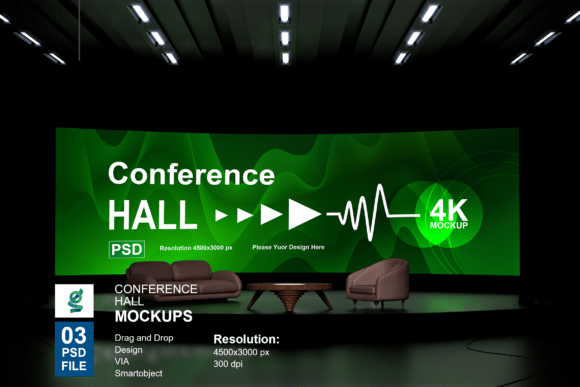
For marketers, agency directors, and freelance designers, the ability to showcase work in a photorealistic setting is about more than aesthetics; it is about risk mitigation and approval confidence. When you present a design superimposed onto a 4500x3000 px rendering of a professional venue, you remove the guesswork. Clients no longer have to imagine how their corporate identity will look on stage. They can see it. This specific mockup resource streamlines that process through intelligent Photoshop architecture, ensuring that your focus remains on creative direction rather than technical manipulation.
Technical Precision and Smart Object Workflow
The primary advantage of this Conference Hall Mockup lies in its engineering. Unlike basic overlays that require manual warping and color grading, this resource utilizes Adobe Photoshop’s Smart Object technology. This feature is critical for maintaining workflow efficiency. When you double-click the smart layer tab, you are presented with a clean canvas. Pasting your design here automatically maps it to the perspective, curvature, and lighting conditions of the 3D-rendered hall once saved. This non-destructive editing capability means you can iterate through dozens of variations in minutes without degrading image quality or rebuilding the scene.
The included package contains three distinct PSD files, offering variety in framing and focal points. Each file is organized with clearly labeled layers, which is a significant time-saver when working under tight deadlines. You are not digging through generic "Layer 1 copy" folders; instead, you have immediate access to adjustment lights and customizable background colors. This level of organization reflects professional industry standards, acknowledging that designers need to adapt the environment to match the client's brand palette, not just the other way around.
Resolution Standards for Professional Output
In the realm of large-format printing and high-stakes presentations, resolution dictates usability. This mockup delivers at 4500x3000 pixels with a density of 300 DPI. This specification ensures versatility across mediums:
- Digital Proposals: The resolution is high enough to zoom in during screen shares without pixelation, allowing clients to inspect texture and detail.
- Print Portfolios: At 300 DPI, the file supports physical proofing and portfolio books, ensuring the presentation looks as sharp on paper as it does on a Retina display.
- Social Media Teasers: While oversized for Instagram or LinkedIn, the extra pixel count allows for safe cropping and reframing for various aspect ratios without losing fidelity.
Strategic Applications Across Industries
The utility of a Conference Hall Mockup extends far beyond simple graphic design portfolios. Its application is rooted in communication and sales psychology across multiple sectors.
Event Marketing and Sponsorship Sales
For event organizers, selling sponsorship packages is often an exercise in selling invisible value. Sponsors hesitate to commit thousands of dollars to signage they cannot visualize. By using this mockup to place sponsor logos on stage backdrops, podiums, and overhead banners, you transform a line item in a contract into a premium visual asset. This tangible preview can significantly shorten sales cycles and justify higher tier pricing by demonstrating the prominence of the placement.
Corporate Identity and Internal Communications
When rolling out a rebrand or announcing a major company milestone, internal buy-in is as important as external perception. HR and communications teams can use these renderings to create excitement for upcoming annual general meetings or product launches. Seeing the new mission statement illuminated on a professional stage helps employees connect emotionally with the strategic shift, making the change feel established and significant.
Educational and Non-Profit Fundraising
Universities and non-profits often rely on galas and conferences for funding. Grant committees and donors respond better to polished, professional visuals than to text-heavy proposals. Utilizing a high-end venue mockup signals organizational competence and attention to detail. It suggests that the institution has the infrastructure and professionalism to manage large-scale events responsibly, which indirectly builds trust in their stewardship of funds.
Enhancing Freelance and Agency Portfolios
For individual creators and boutique agencies, standing out in a saturated market requires demonstrating contextual understanding. A portfolio filled with flat vector art shows technical skill, but a portfolio featuring immersive environmental applications shows strategic thinking. Potential clients are hiring you to solve business problems in real-world environments. Using this Conference Hall Mockup demonstrates that you understand scale, legibility, and environmental integration. It positions you not just as a decorator, but as a partner who understands the logistics of live events.
Practical Considerations for Implementation
While the Smart Object functionality makes this tool accessible, achieving a truly convincing result requires attention to detail. The model images and photographs included are for presentation structure only; the success of the final image depends on how well you integrate your specific content.
Lighting Consistency: Even with adjustable light layers, ensure your source artwork matches the ambient temperature of the hall. If the venue rendering has cool blue stage lighting, placing a warm, unadjusted yellow logo may look pasted on. Use the provided adjustment layers to harmonize color temperatures.
Texture and Realism: Stage surfaces are rarely perfectly matte. Consider adding subtle noise or blend modes to your smart object content to mimic the texture of projection screens, fabric drapes, or glossy panels. This micro-detail prevents the design from looking too sterile against the organic complexity of the 3D render.
File Management: Given the high resolution and multiple smart objects, these PSD files can be resource-intensive. Ensure your workstation has adequate RAM and scratch disk space. Working with linked smart objects rather than embedded ones can sometimes improve performance if you are iterating across all three PSD variations simultaneously.
Making the Right Choice for Your Presentation Needs
Selecting the right visualization asset is a balance between flexibility and specificity. This Conference Hall Mockup excels because it offers a neutral yet sophisticated backdrop that adapts to various industries without overpowering the inserted content. The inclusion of three unique angles provides narrative options: a wide shot for establishing scale, a mid-shot for focusing on stage branding, and potentially a detail-oriented view for texture work.
Ultimately, the value of this resource is measured in time saved and approvals gained. In professional services, the ability to rapidly prototype environmental graphics reduces revision rounds and aligns expectations early. Whether you are a seasoned art director refining a pitch or an entrepreneur preparing for your first major expo, leveraging high-fidelity 3D renderings transforms your presentation from a speculative concept into a confident, visual promise. The one-click smart object workflow removes the technical friction, allowing you to deliver exceptional visual communication that resonates with your audience and secures the necessary stakeholder alignment.