Landscape Brochure Mockup: Elevate Your Print Design
Presenting a flat, two-dimensional design to a client or on a portfolio website often fails to capture the true essence of the final printed product. This is where a high-quality landscape brochure mockup becomes an essential tool for designers and marketers. Rather than relying on imagination, this resource provides a photorealistic 3D rendering that bridges the gap between digital concept and physical reality. Specifically designed as an A5 landscape format, this mockup allows you to visualize exactly how your layout, typography, and imagery will interact with paper texture, lighting, and depth before a single sheet is printed.
The primary value of using a professional mockup lies in its ability to communicate quality and professionalism instantly. When you are pitching a travel guide, a corporate report, or an event program, the presentation is just as important as the content. A well-executed 3D rendering adds tangible weight to your proposal. It reassures stakeholders that you have considered the physical user experience, not just the digital file. For freelancers and agency owners, this level of detail can be the deciding factor in winning a contract or securing approval on a first draft.
Key Features That Streamline Your Workflow
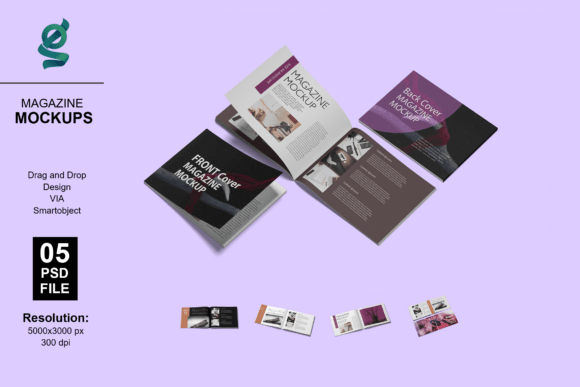
Efficiency is critical when managing multiple revisions or tight deadlines. This A5 landscape brochure mockup is engineered to save time without sacrificing visual fidelity. The package includes seven distinct Adobe Photoshop (PSD) files, offering a variety of angles and compositions to suit different presentation needs. Whether you need a hero shot for a website header or a detailed close-up to showcase paper quality, having multiple organized options prevents the need to search for additional resources later.
At the core of this template is the Smart Object functionality. This feature is what makes the mockup accessible to users of all skill levels, from seasoned art directors to small business owners handling their own marketing. Instead of manually warping images or adjusting shadows to fit a perspective, the smart layer automates the process. You simply paste your flat design, and the software handles the distortion, lighting integration, and texture mapping automatically. This ensures that every presentation looks consistent and professionally lit, regardless of your technical expertise in 3D rendering.
Customization extends beyond just placing your artwork. The included adjustment layers allow you to modify background colors and lighting conditions to match your brand identity or the specific mood of the project. If you are presenting a minimalist tech brochure, a clean white or grey background might be appropriate. Conversely, a vibrant tourism pamphlet might benefit from a warmer, more colorful backdrop. With a high resolution of 3000x2000 pixels at 300 DPI, these files are versatile enough for both screen viewing and high-quality print proofs, ensuring your work looks sharp in any context.
Practical Applications Across Industries
The versatility of an A5 landscape format makes this mockup suitable for a wide array of projects. In the tourism and hospitality sector, this size is standard for destination guides, hotel welcome books, and activity brochures. Using a realistic mockup helps convey the tactile experience of holding a travel guide, which is crucial for selling an emotional connection to a destination. For educational institutions, this format works perfectly for course catalogs, campus maps, and orientation materials, allowing administrators to preview readability and layout flow before committing to large print runs.
Corporate and B2B communications also benefit significantly. Annual reports, product specification sheets, and conference programs often utilize the landscape orientation to accommodate wide data tables, panoramic photography, or side-by-side comparisons. Presenting these documents in a polished 3D environment demonstrates attention to detail and organizational competence. Real estate agents can use this mockup to showcase luxury property listings, where the horizontal format mirrors the wide aspect ratio of architectural photography, giving potential buyers a premium feel of the listing before they even visit the open house.
For creative professionals and students building portfolios, this mockup serves as a vital showcase tool. Portfolios filled only with flat JPEGs can look monotonous. Integrating 3D renderings breaks up the visual rhythm and demonstrates that you understand print production standards. It shows prospective employers or clients that you design with the final medium in mind, a skill that is highly valued in the graphic design industry. Even hobbyists and DIY creators can use this to visualize personal projects like zines, wedding programs, or community newsletters, adding a layer of polish that elevates passion projects to professional standards.
How to Customize Your Mockup in Minutes
Getting started with this landscape brochure mockup is straightforward, even if you are new to Adobe Photoshop. The process relies entirely on the Smart Object workflow, which eliminates complex manual editing. Follow these simple steps to generate your presentation:
- Open the PSD File: Launch Adobe Photoshop and open the specific angle or composition file you wish to use from the set of seven included options.
- Locate the Smart Layer: In the Layers panel, find the layer clearly marked as a Smart Object. It typically has a distinct icon indicating it is editable.
- Edit the Contents: Double-click directly on the Smart Object thumbnail. This action opens a new tab containing the flat template area.
- Paste Your Design: Place your prepared A5 landscape artwork into this new tab. Ensure your design covers the designated canvas area completely.
- Save and Close: Save the changes (Ctrl+S or Cmd+S) and close the smart layer tab. Do not close the main mockup file.
- View Result: Return to the original mockup tab. Your design will now be automatically mapped onto the 3D brochure with correct perspective and lighting applied.
After placing your design, take a moment to explore the adjustment layers. You can tweak the global light intensity to make the brochure appear brighter or more dramatic, or change the background color swatch to create contrast with your cover art. Because the layers are organized logically, you won't waste time hunting for the right control. Remember that the model images and photographs seen in preview galleries are for demonstration purposes only; the focus remains entirely on showcasing your unique creative work.
Important Considerations Before You Begin
While this mockup is designed for ease of use, there are a few practical factors to keep in mind to ensure the best results. First, always prepare your source design at the correct dimensions and resolution. Since the mockup is 300 DPI, using low-resolution source files will result in pixelation or blurriness in the final render. Ensure your bleed and safe zones are accounted for in your flat design so that critical text doesn't get lost in the fold or edges during the 3D mapping process.
Consider the context of where the final image will be displayed. If you are creating a thumbnail for a marketplace or a social media post, choose a composition that remains legible at small sizes. If the image is for a high-resolution portfolio or client proof, utilize the full 3000x2000 px capability. Additionally, while the customizable backgrounds are powerful, avoid choosing colors that clash with or distract from your brochure design. The mockup should enhance your work, not compete with it. Neutral tones often work best unless you have a specific branding requirement.
Finally, remember that this tool is meant to simulate reality, not replace it. Always verify your color profiles (CMYK vs. RGB) and font licensing for the actual print production separately. The mockup is a visualization aid for presentation and approval stages. By understanding both the capabilities and the limitations of this landscape brochure mockup, you can leverage it effectively to communicate your vision clearly, secure stakeholder buy-in faster, and present your work with the confidence of a seasoned professional.