Discount Deadline Icon: Designing Urgency for E-Commerce
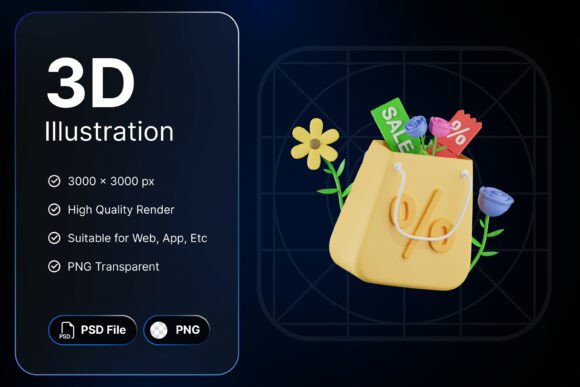
In the fast-paced world of online shopping, timing is everything. The Discount Deadline Icon is a powerful visual tool crafted to capture attention and drive action. Featuring a bold blue stopwatch, a red percentage symbol, and dynamic motion lines, it communicates urgency with clarity and style. Set against a dark navy backdrop and accented with spring flowers, this icon is more than a countdown—it’s a call to act now.
Why the Discount Deadline Icon Stands Out
Visual communication is key in digital marketing, especially when trying to convey time-sensitive offers. The Discount Deadline Icon combines several visual cues—color contrast, motion, and symbolism—to create a sense of urgency without overwhelming the viewer. The blue stopwatch signals time, the red percentage hints at savings, and the motion lines suggest speed and energy. These elements work together to create a cohesive message that users understand instantly.
This icon is available in high-resolution PSD and transparent PNG formats, making it versatile for different design workflows. Whether you're building a flash sale banner or a countdown widget, the 3000x3000px resolution ensures crisp visuals across devices and platforms.
Creative Uses for the Discount Deadline Icon
While the icon is designed with e-commerce in mind, its applications extend beyond product pages. Here are some creative ways to integrate it into your digital assets:
- Flash Sale Countdowns: Use the icon in banners or pop-ups to highlight limited-time offers. Pair it with a live countdown timer and bold text like “48 Hours Only” to reinforce urgency.
- Email Campaign Headers: Incorporate the icon into promotional emails to draw the eye toward time-sensitive deals. A small icon next to the subject line preview can increase open rates.
- Mobile App Notifications: In apps, the icon can appear in push notifications or within the UI to remind users of expiring deals.
- Social Media Posts: Add the icon to Instagram stories or Facebook ads to visually emphasize a deadline. Combine it with bold text overlays for maximum impact.
Adapting the Icon for Different Audiences
The Discount Deadline Icon is flexible enough to be used across industries and audience types. Here’s how different professionals can make the most of it:
- Marketers: Use the icon in landing pages or promotional banners to highlight seasonal sales or exclusive offers. Pair it with persuasive copy like “Limited Stock” or “Hurry, Sale Ends Soon” for stronger conversions.
- Designers: Integrate the icon into UI kits or design templates. Since it comes with a transparent background, it can be layered over different color schemes and textures without losing visual integrity.
- Bloggers & Influencers: Incorporate the icon in affiliate marketing posts or sponsored content to highlight time-bound discount codes. It helps viewers recognize value quickly.
- Small Business Owners: Use the icon on your Shopify or WooCommerce site to highlight flash sales or exclusive customer offers. Even a simple placement next to a product badge can make a difference.
Design Tips for Maximum Impact
When using the Discount Deadline Icon, consider these design best practices to ensure clarity and effectiveness:
- Balance the Composition: Don’t let the icon overpower the rest of the layout. Use white space and alignment to guide the viewer’s eye naturally toward the offer.
- Pair with Complementary Fonts: Choose bold, sans-serif fonts for headlines and clean, readable fonts for supporting text to maintain visual harmony.
- Use Color Strategically: The dark navy backdrop and red-blue contrast already draw attention. Keep surrounding elements minimal to avoid visual clutter.
- Maintain Consistency: If you use multiple icons or assets, keep the design style uniform. The Discount Deadline Icon works best when it fits seamlessly into your existing brand visuals.
Project Ideas to Inspire Your Workflow
Here are a few project ideas that can benefit from incorporating the Discount Deadline Icon:
- Seasonal Sale Pages: Create a dedicated landing page for holiday deals or end-of-season clearance. Use the icon prominently in the header and alongside individual product blocks.
- Mobile App UI Elements: Design a “Limited-Time Offer” section within your app interface using the icon as a visual anchor for each deal.
- Email Newsletters: Feature the icon in your promotional email headers or as a recurring visual motif in your weekly deals section.
- Social Media Countdowns: Build a series of countdown posts for a product launch or sale, using the icon in each visual to maintain continuity and recognition.
Staying Original While Keeping It Effective
While the Discount Deadline Icon provides a strong foundation, it’s up to the designer or marketer to use it in a way that feels fresh and relevant. Here are a few ways to keep your use of the icon original:
- Customize Surrounding Elements: Since the icon itself cannot be edited in color or shape, focus on customizing the background, layout, or typography around it to create unique variations.
- Experiment with Animation: If you’re working in a digital environment that supports animation, consider adding subtle movement to the icon or its surrounding elements for added visual interest.
- Combine with Seasonal Themes: Use the icon in holiday-specific promotions, but pair it with themed illustrations or color palettes to give it a seasonal twist.
- Test Different Placements: Try using the icon in less traditional areas of your site or app—like in the navigation bar or footer—to see how it performs in unexpected contexts.
Final Thoughts
The Discount Deadline Icon is more than a design asset—it’s a strategic tool for creating urgency and driving action. Whether you’re a marketer looking to boost conversions, a designer building a UI kit, or a small business owner launching a flash sale, this icon offers a visually compelling way to communicate time-sensitive offers.
By understanding its design elements, exploring creative applications, and tailoring its use to your specific audience and platform, you can make the most of this powerful visual cue. Keep your designs clean, your messaging clear, and your visuals consistent, and you’ll be well on your way to turning time into a selling point.